2WinScada
Features and package scope
2WinScada is SCADA software that runs on a server at your site and is used in a web browser. It collects data from your devices and lets you monitor your plant in one interface:
- Monitoring: live values, device states and screens built for your project.
- Alarms and notifications: alarm definitions, alarm history and email; SMS and WhatsApp depending on the package.
- Historical data and energy: trends, reports and energy consumption per meter.
The Package scope box at the end of each section shows the feature's status in the Starter, Standard and Professional packages, from the same data as the table on the Licensing page. "Can be added to your quote" means the feature is not in the base package but can be added to your quote.
Monitoring in the browser
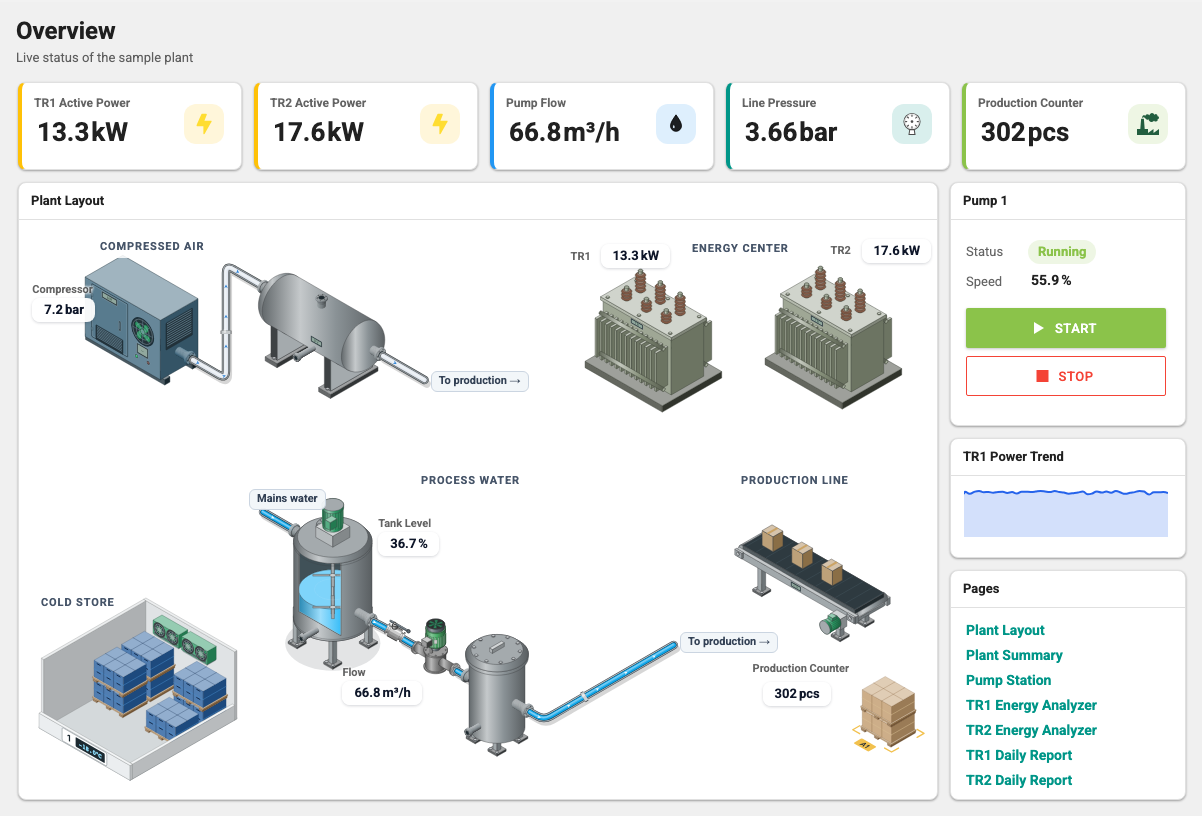
- Live values, device and tag states, your own screens and dashboards.
- Users work with roles and process group permissions. Each user sees only the data they have permission to see.
- Kiosk mode on Panel PCs and wall displays. Each kiosk display counts as one web user.
Package scope
Browser-based monitoring, historical data, consumption reports
- Starter
- Includedlimited capacity
- Standard
- Included
- Professional
- Included
Starter's license capacities are listed on the Licensing page.
Alarms and notifications
- Alarm definitions, alarm history and alarm acknowledgment.
- Users with the matching role manage alarm and notification definitions in every package. Starter allows up to 150 alarm definitions.
- Email notifications are in every package.
SMS and WhatsApp conditions
- SMS notifications work with the supported providers: Netgsm, İleti Merkezi, Verimor and Twilio. API access must be enabled with the provider.
- WhatsApp notifications are available in 2.10.0 and later. In addition to the license entitlement, they need a Meta account, an approved message template and the recipient's consent.
- The server that runs the notification service needs internet access to Meta's services.
- Do not use WhatsApp as the only alarm channel; keep email or SMS notifications enabled as well.
Package scope
Alarms, notification definitions and email notifications
- Starter
- Included
- Standard
- Included
- Professional
- Included
SMS and WhatsApp notifications
- Starter
- Can be added to your quote
- Standard
- Included
- Professional
- Included
Historical data, reports and energy
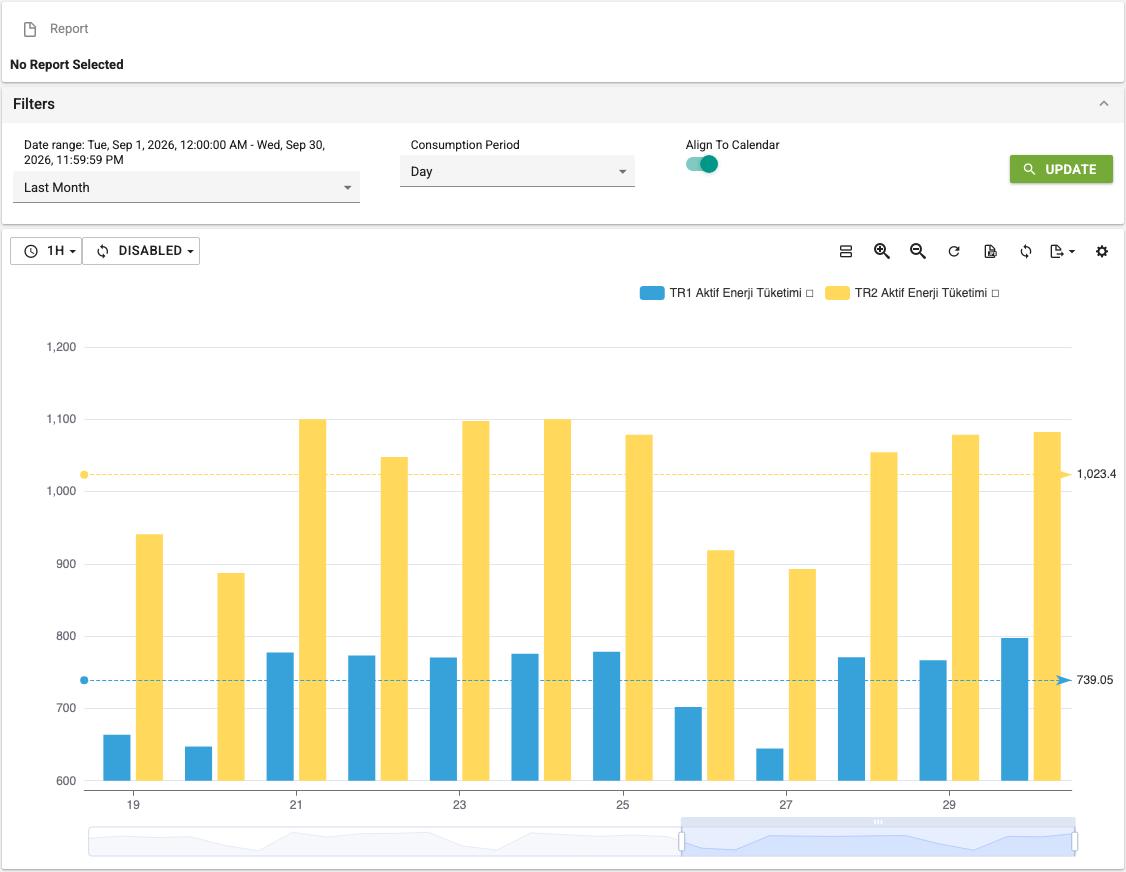
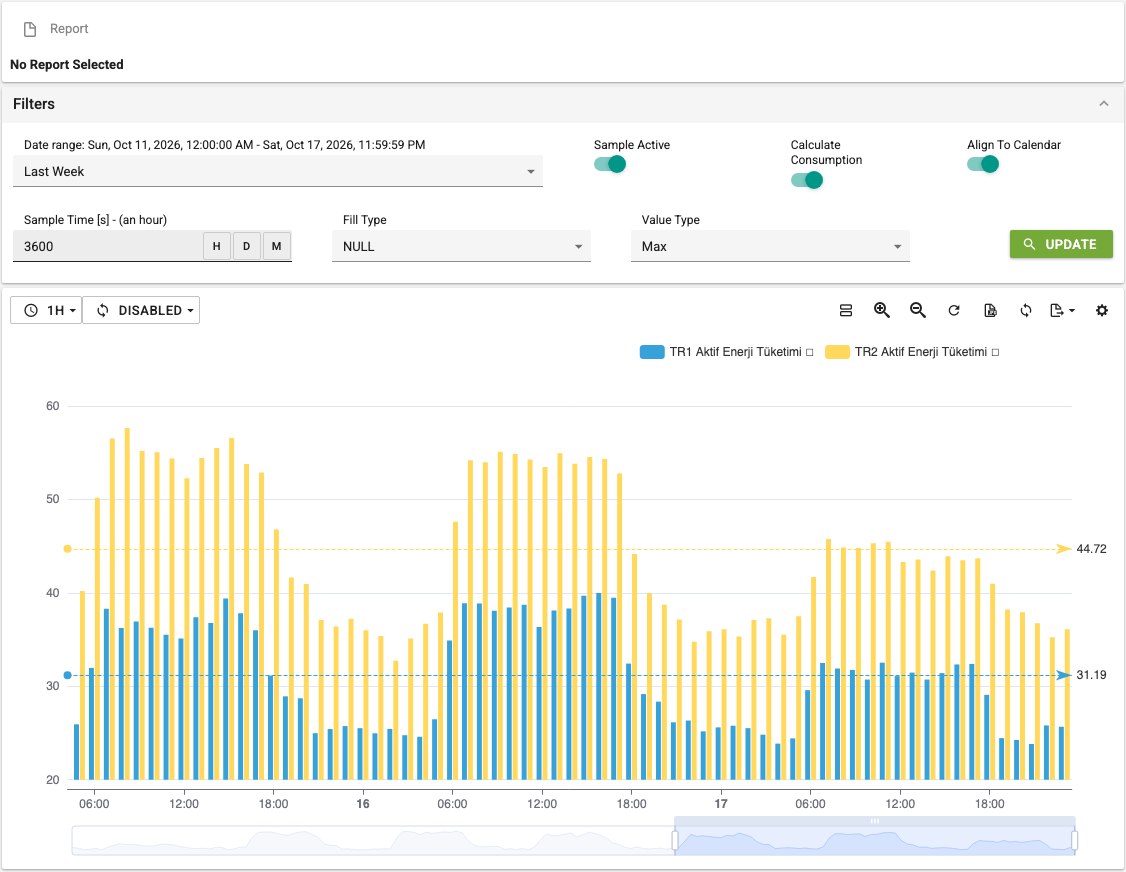
- Historical data and trend analysis. The archive retention period can be set per tag.
- Consumption calculations and consumption reports.
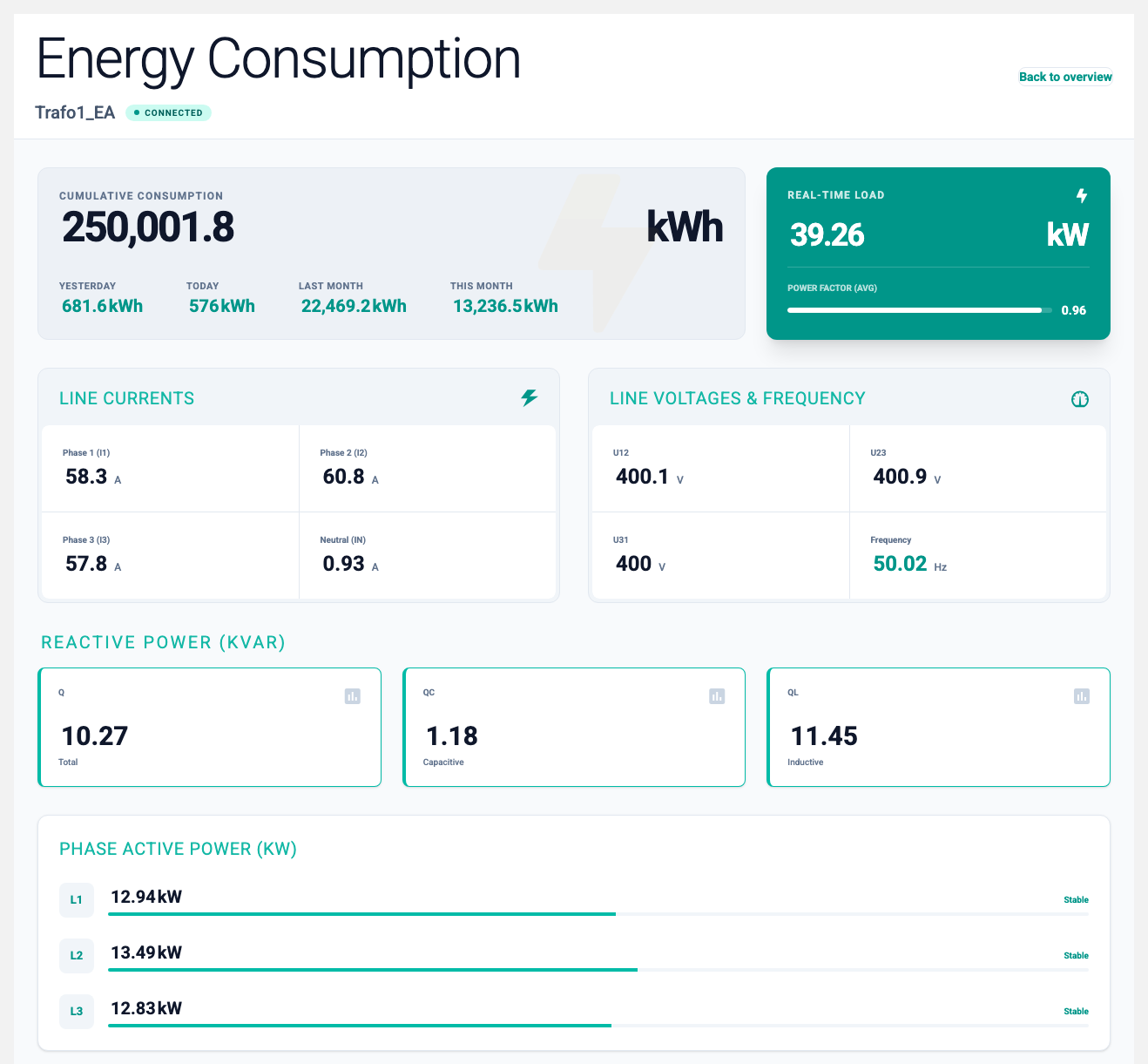
- Archives and reports energy consumption per meter; can be used as a data source for an ISO 50001 energy management system.
- Production analytics is a separate module: run/stop analysis, downtime reasons, downtime Pareto and downtime entry by operators.
- Monthly energy performance reports are a separate module; see Energy Performance.
- Some reports and report groups need a separate package entitlement. We clarify in the quote which reports your package includes.
Package scope
Browser-based monitoring, historical data, consumption reports
- Starter
- Includedlimited capacity
- Standard
- Included
- Professional
- Included
Production analytics: run/stop analysis, downtime reasons and Pareto, downtime entry by operators
- Starter
- Can be added to your quote
- Standard
- Included
- Professional
- Included
Energy Performance
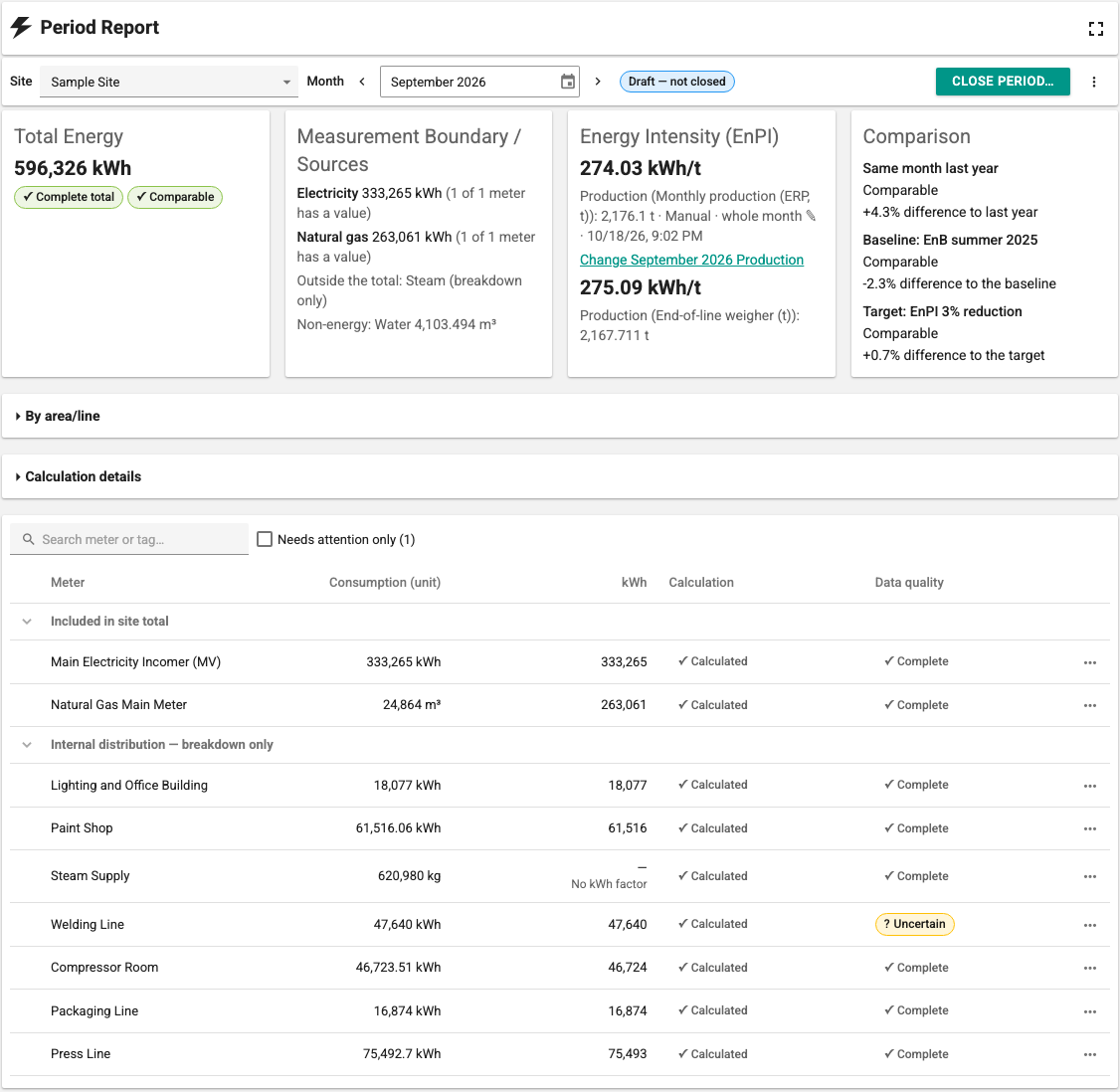
Energy Performance is a separate module available in 2.11.0 and later. It prepares a monthly energy consumption and energy performance report from the meter data that SCADA already archives.
- Electricity, natural gas, water and steam meters; breakdown by site and area/line.
- The report states the measurement boundary: which meters count towards the total and which are only shown in the breakdown.
- Calculation status, data quality and the source of the value for every meter and month. Corrections are recorded with their reason.
- Energy intensity relative to production (for example kWh/t); comparison with a baseline period and a target.
- A closed monthly report cannot be changed. If a change is needed, a new revision is closed and the previous one is kept. Closed reports can be downloaded as XLSX.
- Separate roles for reading, data entry, management and closing.
The module provides measurement and report data; it does not replace your energy management system, certification or audit. The reports show differences, not verified savings or improvements. Before interpreting the results, you assess whether the indicator and the method are suitable for your site.
Package scope
Energy Performance (monthly energy performance reports)
- Starter
- Not available
- Standard
- Can be added to your quotepreselected in new quotes
- Professional
- Can be added to your quotepreselected in new quotes
It needs 2WinScada 2.11.0 or later. Historical data and consumption reports do not depend on this module.
Recipes
Recipe groups and recipes are defined and applied to devices.
Package scope
Recipes
- Starter
- Included2 recipe groups, 20 recipes in total
- Standard
- Included
- Professional
- Included
The recipe capacity in Starter can be raised in the quote.
Screen editor
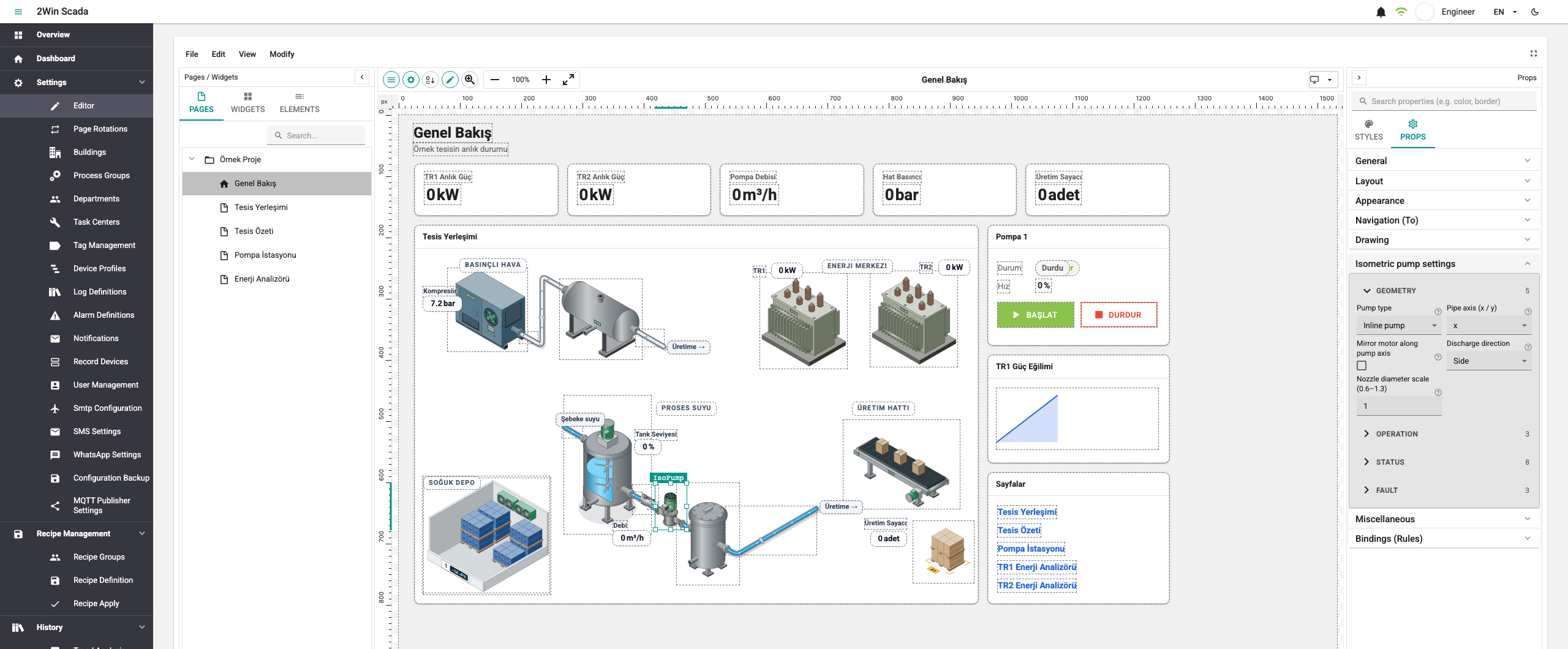
Pages are designed with widgets. Ready-made page templates and blocks can also be used.
Package scope
Screen editor and page templates
- Starter
- Not available
- Standard
- Not available
- Professional
- Included
In the license it is the Page Designer module.
AI assistant and AI-assisted screen preparation
MCP (Model Context Protocol) is a protocol that lets AI clients connect to 2WinScada. MCP is not an AI model. You choose the AI client and model.
Connection and permissions
The 2WinScada MCP server works like this:
- Each client connects with an API key that belongs to a user. Requests run with that user's role and process group permissions.
- MCP access does not grant management, process group or device write rights that the user does not have.
AI assistant
Your AI client reads data and definitions in 2WinScada with the user's permissions. If the user has the permissions, it can also change definitions or apply recipes. Applying a recipe changes values in the field.
AI-assisted screen preparation
Recommended flow:
- The AI client reads the existing structure and prepares a screen draft.
- The AI client has the draft validated with an MCP tool that makes no changes: it checks widget types, data bindings and tag references.
- You review the draft and the validation result.
- You approve creating the screen.
Your AI client carries out these steps; 2WinScada does not enforce the approval step. Set up your AI client so that it does not run tools that make changes without your approval. The AI does not run your plant on its own. Check the prepared screen before you approve it.
Connection to an external service
The AI client and model are often an external service. In that case, the information you give the AI is sent to that service. Assess that service's connection and data terms against your own policy.
Package scope
Working with the AI assistant (excluding screen editing)
- Starter
- Can be added to your quote
- Standard
- Included
- Professional
- Included
AI-assisted screen preparation
- Starter
- Not available
- Standard
- Not available
- Professional
- Included
AI-assisted screen preparation also needs the screen editor (Page Designer) entitlement, so it is offered only in Professional.
System configuration
The system configuration screens are available in every package to users with the matching role. SMTP and backup management are separate modules (see below).
Package scope
System configuration
- Starter
- Included
- Standard
- Included
- Professional
- Included
Managing with your own team
Your integrator sets up your installation; managing it with your own team is included in Professional. This covers:
- tag, process, work center, organization (building and department) and user management,
- backup and SMTP management.
Package scope
Managing tags, processes, work centers, organization and users with your own team
- Starter
- Can be added to your quote
- Standard
- Can be added to your quote
- Professional
- Included
Backup and SMTP management
- Starter
- Can be added to your quote
- Standard
- Can be added to your quote
- Professional
- Included
File-based recording devices (RecordDevice)
Data is taken from the files of devices that record to files.
Package scope
Data from file-based recording devices (RecordDevice)
- Starter
- Can be added to your quote
- Standard
- Can be added to your quote
- Professional
- Included
In Starter and Standard, definition and operation can be added to your quote together.
Installation and capacity
- 2WinScada runs on supported 64-bit Windows versions.
- Capacity is planned for your project: we look at tag and device counts, archiving rates and user load together. We share the hardware recommendation and capacity figures in the quote discussion.
- "No license quota" in the license does not mean there is no technical capacity limit.
Which scope does your project need?
We work out together in a demo meeting which features and package scope fit your site. Prices are part of the quote.